Amazon KDP Keywords: How to Fill All 7 Slots So Your Book Gets Found
The exact research process for choosing 7 backend keywords that rank: where to find them, how to combine phrases, and the mistakes that waste your slots.

Two coloring books with identical art can have wildly different sales for one reason: one of them shows up when parents type "dinosaur gifts for 5 year old boys" and the other doesn't. Amazon gives every book seven backend keyword slots. Most publishers fill them in ninety seconds with guesses. This guide is the research process that fills them with search terms buyers actually use.
How Amazon Actually Indexes Your Book
When a shopper searches, Amazon matches their query against several fields of your listing — roughly in this order of weight:
- Title and subtitle — the strongest signal. Your main niche phrase belongs here ("Ocean Animals Coloring Book for Kids Ages 4–8").
- Backend keywords — the seven hidden slots. Buyers never see them; the search engine reads every word.
- Categories — determine which browse paths and filtered searches include you.
- Sales history and conversion — once you start selling for a term, Amazon shows you for it more. Keywords open the door; the product keeps it open.
Two practical consequences. First, keywords duplicated from your title add nothing — they're already indexed, so a repeated word is 50 characters of wasted coverage. Second, Amazon combines words across your fields: if the title says "dinosaur" and a backend slot says "gifts for boys 5 year old", you can match "dinosaur gifts for boys".
Finding Keywords: Three Free Methods That Cover 90%
Method 1 — Amazon Autocomplete (the alphabet soup)
- Open Amazon in an incognito window (so your history doesn't skew results).
- Select the Books department, then type your seed:
dinosaur coloring book. - Record every suggestion. Then append each letter: "dinosaur coloring book a…", "…b", "…c" — each letter surfaces new real queries.
- Repeat with buyer-intent seeds that don't name the product:
gifts for 5 year old,quiet activities for kids,stress relief for adults.
Autocomplete only shows phrases people genuinely type, ranked roughly by volume. Fifteen minutes here beats most paid tools.
Method 2 — Competitor Archaeology
- Search your main niche phrase and open the top 10 results.
- Copy the recurring words from their titles and subtitles — those repeats are there because they convert.
- Read their reviews and note the buyer's language: "bought this for my grandson", "perfect stocking stuffer", "great for road trips". Those phrases are keyword gold because they describe the occasion, not the product.
Method 3 — The "Also Searched" Trail
On competitor pages, check "Products related to this item" and the search terms Amazon shows under "Customers who viewed this item also viewed". These reveal adjacent niches you'd never brainstorm — the buyer who views dinosaur books also searches "prehistoric animals", "T-rex", and "paleontology for kids".
The 7-Slot Framework for Coloring Books
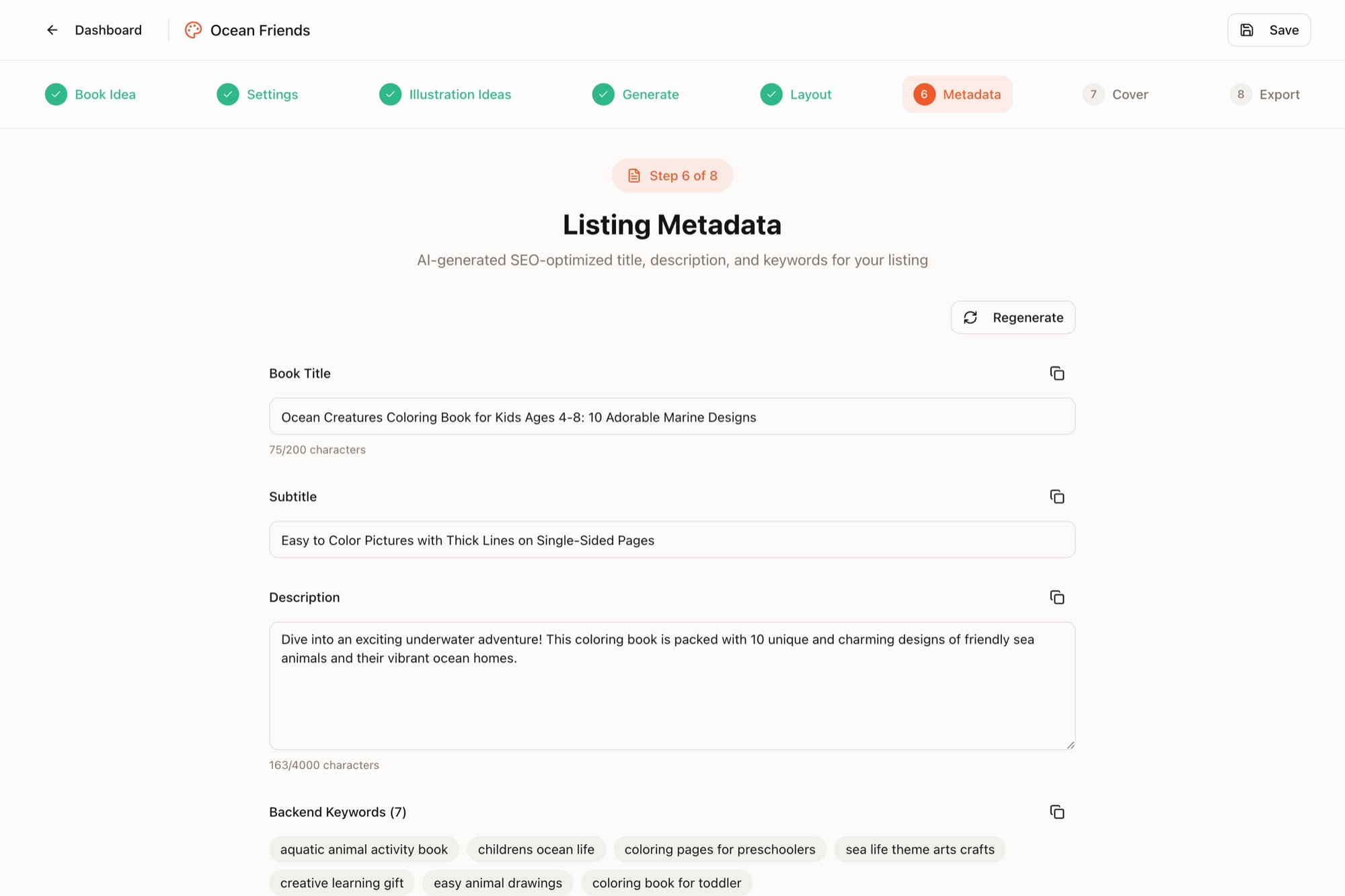
Don't fill slots with random synonyms — give each slot a job. Here's the framework with a worked example for "Ocean Animals Coloring Book for Kids Ages 4–8" (words from the title deliberately never repeated):
| Slot | Job | Example (chars) |
|---|---|---|
| 1 | Gift occasions | gifts for 5 year old boys girls stocking stuffer (48) |
| 2 | Spelling & synonyms | colouring sea creatures fish shark dolphin whale (47) |
| 3 | Format synonyms | activity workbook toddler preschool kindergarten (48) |
| 4 | Adjacent interests | under the sea marine life beach summer vacation (47) |
| 5 | Use cases | quiet time screen free travel road trip airplane (48) |
| 6 | Buyer identity | homeschool teacher classroom party favors daycare (49) |
| 7 | Theme long-tail | octopus turtle seahorse jellyfish crab starfish (47) |
Formatting rules inside a slot:
- Separate words with spaces — no commas, quotes, or semicolons needed.
- Lowercase is fine; matching isn't case-sensitive.
- Singular vs. plural: pick one, Amazon handles the other.
- Aim for 40–50 characters per slot. Short slots are unclaimed territory.
What Will Get You Suppressed
KDP explicitly prohibits certain keyword types — these cause hidden listings or blocks:
- Trademarked brands and characters: Disney, Bluey, Pokémon, Crayola, Barbie — even if your book "matches the vibe". This is the #1 account risk for coloring book publishers.
- Other authors' names ("in the style of Johanna Basford").
- Subjective or temporary claims: best, bestselling, new, free, on sale, top rated.
- Irrelevant terms: stuffing "mandala" into a dinosaur book confuses the algorithm and tanks conversion, which hurts rank more than the extra impressions help.
Test, Measure, Replace
- Baseline (week 0): in incognito, search your 5 most important phrases and record your page/position for each.
- Wait 4–6 weeks. Rankings need sales data to move; daily checking tells you nothing.
- Re-check. Ranking and selling? Leave it alone. Ranked but not selling? Your cover or price is the problem, not keywords. Not ranked at all? Replace that slot with a less competitive phrase.
- Change one or two slots at a time, never all seven — otherwise you can't tell what worked. Updates go live after a short re-review, with no impact on reviews or rank history.
Frequently Asked Questions
How many keywords does Amazon KDP allow?
Seven backend keyword slots, each holding up to 50 characters. Every slot can (and should) contain a multi-word phrase rather than a single word — that's up to 350 characters of search real estate in total.
Should I repeat words from my title in KDP keywords?
No. Amazon already indexes every word in your title, subtitle, and categories. Repeating them in backend keywords wastes characters that could cover new search phrases instead.
Can I change KDP keywords after my book is published?
Yes, at any time and as often as you like. Edit the book details in your KDP Bookshelf; the update goes through a short re-review (usually under 72 hours) and doesn't affect your reviews or sales rank. Revisiting keywords every 4–6 weeks on slow sellers is standard practice.
What keywords are not allowed on KDP?
Trademarked names and brands (Disney, Crayola, Barbie), other authors' names, subjective claims like 'best' or 'bestselling', time-sensitive words like 'new' or 'free', and anything unrelated to your book's content. Using them can get your listing suppressed or your account flagged.